One stop for all your PI Tag Configuration
The CONFIGURATION tool can be accessed from here and the MODIFICATION tool can be accessed from here.
This powerful software solution is designed to streamline the process of creating and editing PI tags, a crucial component in industrial data monitoring and analysis. With user-friendly features and robust capabilities, this tool empowers users to efficiently manage and customize PI tags, enhancing data accuracy and accessibility in industrial settings. Whether you're an engineer, operator, or data analyst, this tool simplifies your workflow and ensures the integrity of your data for improved decision-making and process optimization.
In order to improve OSIsoft PI end-user experience and ownership for creating PI tags (building blocks of the PI system), and to assure product performance and data integrity via correct and consistent tag configuration, an automated and self-supported PI tag configuration tool needed to be developed.
By doing so, the amount of time spent on creating PI tags has been greatly reduced by 90% with a lean workflow with the least amount of involved participants and handovers will be ensured. Reducing time to delivery for PI tag work will ensure that the business does not experience delays in access to operational data.
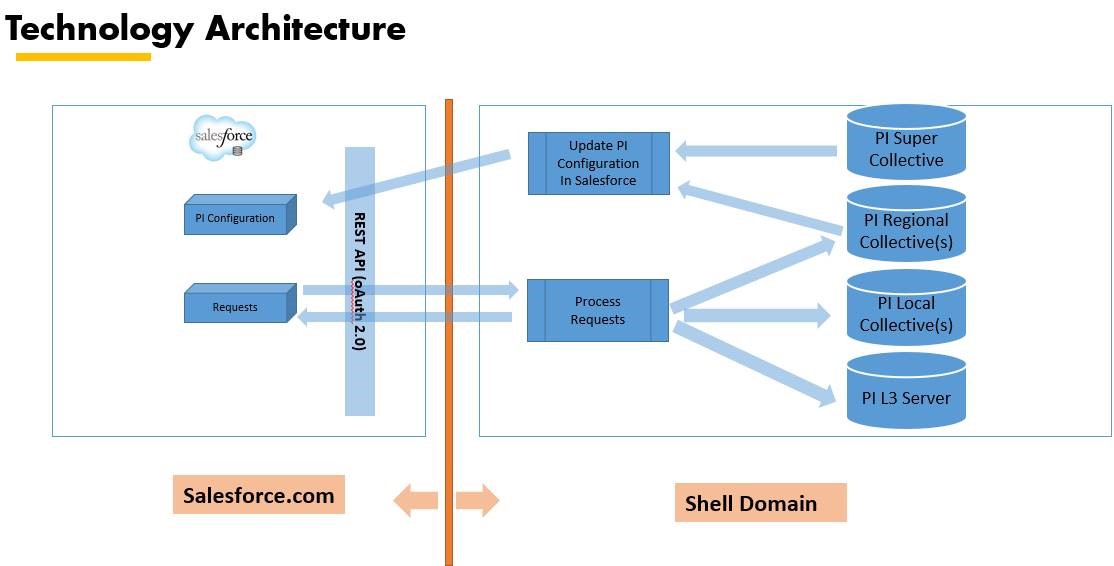
Together with DS, UP & IG PI business, PI CoE and PT-IT SF team, a product has been developed, named as Tag Configuration Tool (TCT) which changed the way how PI tags were created in the past, making a step ahead into Shell's digitalization journey and an incredibly fast method of how tags are created accurately. The tool which runs on "force.com" cloud is accessible via laptops, mobiles, iPad's, etc.
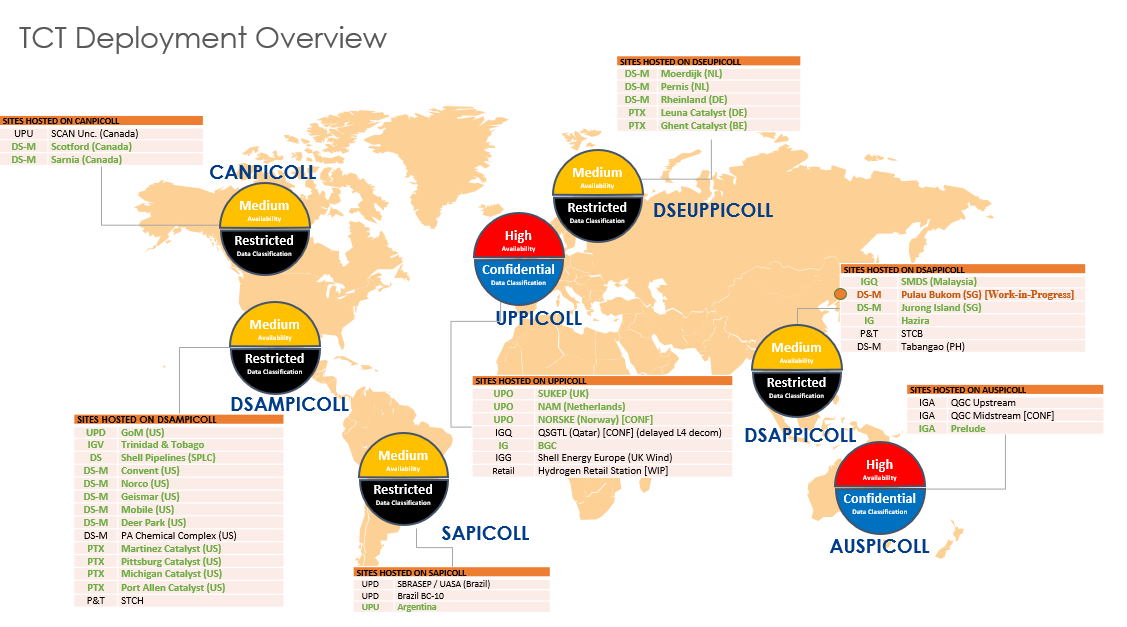
Rolled out currently in 42 sites. The uptake for this in the remaining sites are very high. A dedicated TCT development and support team is in place to assist the TCT users globally.
TCT Deployment Overview
High Level Architecture
Get Access to TCT
To add new user or modify existing user access (like requests to Create, Update & Delete Users' accounts, and for Roles as Requestor, Admin & Approver), please raise a SNOW request.
- -- Go to the SNOW Catalogue, alternatively search for "Salesforce - Integrated Gas, Upstream and Project & Technology - Application Access Management".
- -- Select 'Application Type' as 'PI Tag Configurator'.
- -- Select 'Request Type' based on your requirement. For example as 'Access Creation' to get Approver access.
- -- Click Next.
- -- Fill Business Justification.
- -- Select 'Single' under 'User Access detail' for single user request and 'Bulk' for multiple users.
- -- Select role under 'Role required for' field, for example 'Approver'.
- -- Click Next.
- -- Click Order Now.
To onboard an asset to TCT, please reach out to us via Let's Connect from below.
Get in touch
Get solutions, resolve your queries, and explore